A contractor portal for assigned defect repairs.
Give contractors and in-house teams the details they need: location, photos, address and deadline. They update progress and submit photos of completed work. Your team reviews the result and closes the case. Contractor access is included in your subscription.
Book a demo"I never got that email"
Contractors run on phone calls and forwarded emails, so instructions arrive incomplete, visits are agreed verbally, and "done" is a text message. When an owner disputes the repair a year later, nobody can show what was asked, what was fixed, or who accepted it.

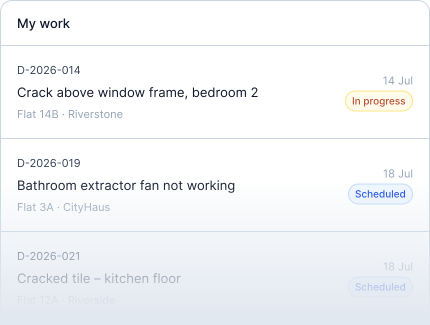
Each team sees its assigned work.
A contractor sees defects assigned to their team and conversations your staff include them in. They cannot browse unrelated records, your full owner directory, internal notes, prices or your customer care team's defect list.
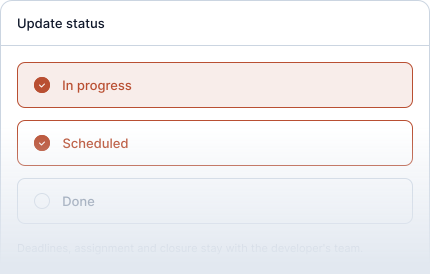
In progress, scheduled, done
Those are the states a contractor can set. Deadlines, assignment, closing and cancelling stay with your team. When a visit is agreed, the scheduled date is on the case and the owner is notified.
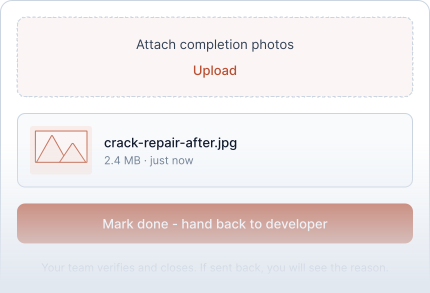
Done means "ready for you to check"
Before handing a job back, the contractor attaches photos of the finished work. Your team verifies and closes the case, or sends it back with a reason the contractor can read. Every step carries a time and an author and cannot be edited afterwards.
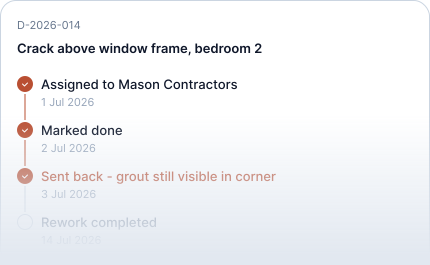
Declined, reassigned, disputed, all on the record
A contractor who cannot take a job declines it with a reason; you reassign. A late case escalates. A contested repair shows a disputed state rather than sitting in someone's inbox. The reasons stay on the case, where both sides can read them.
Why they actually use it
- An email with one link. No account to create, no password, nothing to install.
- Everything they need on the case: room, pin, photos, address, deadline.
- No seat fee and no licence per person; your administrator adds their colleagues to the team.
- Internal departments use the same area as external contractors.
- A contractor can work with several developers. Each developer grants access separately, and their records stay separate.
For the contractor
Open an assigned defect to see the location, instructions and deadline. Arrange the visit, complete the work, add photos and mark it done for the developer to review. If more work is needed, the reason is recorded on the case.
Frequently asked questions
What information can a contractor access?
Only defects assigned to their team and conversations your staff explicitly include them in. Assignments can span several projects; unrelated records and your internal information stay private.
Can a contractor close a case?
No. They mark the work done and attach the evidence. Your team verifies and closes it, or sends it back.
Can contractors add their own people?
Your administrator adds their colleagues to the team, so you always know who has access.
Can a contractor talk to the owner?
Only in a conversation your staff added them to. The owner can see who is in it.
Do we pay per contractor?
No. There is no additional charge for contractors, owners or staff. Your subscription is priced by active homes.
See how Toveta would work for your team.
Choose a case you would like to discuss. In thirty minutes, we will show how Toveta supports the process, from the homeowner's report to your team's review and case closure.
Book a demo