Track defect deadlines and arrange repair visits.
Your team sets the deadline and the owner sees it. Visits are proposed, confirmed, rescheduled, missed or completed on the record. Owners, contractors and staff each get an email at the moments that concern them, and every email is logged before it is sent.
Book a demo"Some time next week"
A date agreed by phone can be hard to find later. Without a recorded deadline or visit, the owner has to ask for updates and your team has to chase the details. Keep agreed dates on the case so everyone involved can refer to them.
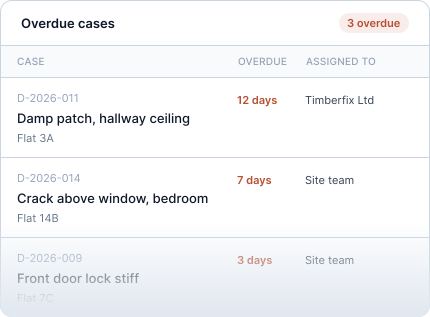
One date, set by you, seen by the owner.
Your team sets the deadline when reviewing the case, and the owner sees it in their timeline. Until then, the timeline explains that their manager will set it. Reports show overdue cases and how long cases have been open, by project and team. An alert is sent when a deadline passes.
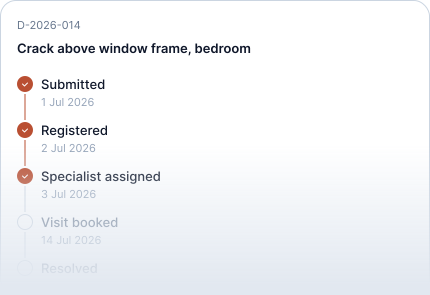
The owner watches the date.
Every defect has a progress timeline. The committed date is visible at every step. Owners are not asked to choose; your team commits, and the platform makes it visible.
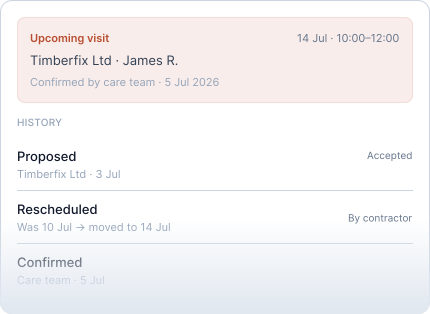
Proposed, confirmed, rescheduled, no-show, completed.
A visit is proposed by your staff or the contractor and confirmed on the case. The scheduled date shows on the defect. Reschedule it, cancel it, or record a no-show, and the history keeps every version. The owner is notified when a visit is agreed and when it changes.
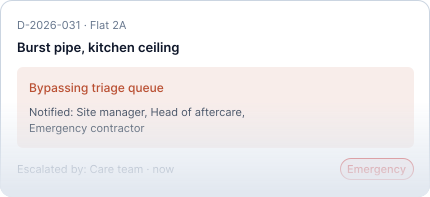
A different route for the burst pipe.
Mark a case as an emergency and it goes to the people your rules name, immediately, bypassing the usual triage order. The owner does not choose this; your team does.
Email updates relevant to each role
Owners hear when
- The report was received
- The date was set
- A visit was agreed
- Your team needs information
- A visit was changed
- The case was closed
- A new message arrived
Owners never hear about
- Internal status changes
- Reassignments
- Notes or anything about another home
Contractors hear when
- A job was assigned, reassigned or sent back
- A deadline is near or passed
- A message arrived in a conversation they are in
Staff hear when
- A report or message arrives
- A contractor marks work done
- A deadline is breached
- A case escalates
Frequently asked questions
Can the owner choose the visit time?
Your staff or the contractor propose a time and confirm it on the case. The owner is told when a visit is agreed and when it changes.
Does the owner get an email on every status change?
No. Owners receive updates relevant to them, such as receipt of a report, a deadline being set, a visit being agreed or changed, a request for information, case closure or a new message.
What happens when a deadline passes?
The case is shown as overdue, and an alert goes to the people specified in your notification rules.
Can we change who is notified about what?
Staff notifications follow your routing rules, per project and per team. Owner emails stay fixed so owners always know what to expect.
See how Toveta would work for your team.
Choose a case you would like to discuss. In thirty minutes, we will show how Toveta supports the process, from the homeowner's report to your team's review and case closure.
Book a demo